
Gadgets and more for the thinking majority
Wednesday, July 4, 2012

Monday, July 2, 2012
Jelly Bean, or Why I Am Back to the Galaxy Nexus
This is funny. I have spent weeks trying to justify my reasons for buying Galaxy Note and flashing AOSP Android on it, terming it the best device out there. That was until Jelly Bean was released by Google and the ROM was available for Galaxy Nexus WITHIN 24 HOURS.
First, let's see what are the advantages of a Galaxy Nexus vs any other phone running AOSP Android (including Note):
1) All the hardware features work, that includes USB On The Go and MHL HDMI output.
2) Battery life. Battery life. Battery life.
3) No software incompatibilities, force closes or errors
In short, those are the advantages of running a software on a phone for which it was made. After long experience I have decided that it's not entirely feasible to advise my readers to flash custom ROMs on phones which disable a few features.
So why did I switch? To be perfectly clear, don't think for a second I was unhappy with my Note. No, what attracted me what this:
1) Google's announcement of Jelly Bean and it's features (covered in my previous post)
2) The fact that it was installable on Galaxy Nexus within 24 hours of announcement
Specifically, I was intrigued by Project Butter. Would it bring the speed and smoothness that are being claimed? It turns out - get this - Google actually UNDERSTATED their achievement regarding Project Butter. The Galaxy Nexus seems to have acquired at least an eight core processor and 3 GB of RAM. It is fast AND smooth. And no, it is not the 'perceived smoothness' that is to be found in iPhone. It is REAL. It is INCREDIBLE. It makes me want to cry. It defies explanation. How did they eke out such performance is beyond me.
I will update this post ASAP with a video. Please understand that most videos of Jelly Bean running on Galaxy Nexus on the Web don't do it justice. That is because the UI runs at 60 frames per second and the videos are mostly made at 24 FPS. Which means that it's even better than what you see in videos.
I will also cover other features that I love in Jelly Bean. For now, the summary is that the mobile landscape has changed. HTC and Samsung may be celebrating the successful launch of Galaxy S3 and One X, but a six month old phone has just stabbed them in the back. If you are looking for the best Android phone in the market, BUY THE GALAXY NEXUS. Don't look anywhere else.
First, let's see what are the advantages of a Galaxy Nexus vs any other phone running AOSP Android (including Note):
1) All the hardware features work, that includes USB On The Go and MHL HDMI output.
2) Battery life. Battery life. Battery life.
3) No software incompatibilities, force closes or errors
In short, those are the advantages of running a software on a phone for which it was made. After long experience I have decided that it's not entirely feasible to advise my readers to flash custom ROMs on phones which disable a few features.
So why did I switch? To be perfectly clear, don't think for a second I was unhappy with my Note. No, what attracted me what this:
1) Google's announcement of Jelly Bean and it's features (covered in my previous post)
2) The fact that it was installable on Galaxy Nexus within 24 hours of announcement
Specifically, I was intrigued by Project Butter. Would it bring the speed and smoothness that are being claimed? It turns out - get this - Google actually UNDERSTATED their achievement regarding Project Butter. The Galaxy Nexus seems to have acquired at least an eight core processor and 3 GB of RAM. It is fast AND smooth. And no, it is not the 'perceived smoothness' that is to be found in iPhone. It is REAL. It is INCREDIBLE. It makes me want to cry. It defies explanation. How did they eke out such performance is beyond me.
I will update this post ASAP with a video. Please understand that most videos of Jelly Bean running on Galaxy Nexus on the Web don't do it justice. That is because the UI runs at 60 frames per second and the videos are mostly made at 24 FPS. Which means that it's even better than what you see in videos.
I will also cover other features that I love in Jelly Bean. For now, the summary is that the mobile landscape has changed. HTC and Samsung may be celebrating the successful launch of Galaxy S3 and One X, but a six month old phone has just stabbed them in the back. If you are looking for the best Android phone in the market, BUY THE GALAXY NEXUS. Don't look anywhere else.
Thursday, June 28, 2012
Android Jellybean 4.1 = DA BOMB
There was this little event called Google I/O yesterday, and boy did it shock the non-Apple worshipping portion of the tech world. Here is a list of what Google announced yesterday:
1) Android 4.1 Jellybean
2) Nexus Q, a globular shaped media player
3) Nexus 7 Tablet
4) Upgrade to core Google apps such as Google+, YouTube, Maps, Earth and of course, Play Store itself
5) Availability of movies, TV programs, and books on the Play Store
Whew. Today I am going to cover the most important one: Jellybean.
Who'da thunk it? Just six months after unleashing Android 4.0 ICS on to the world, Google are back with 4.1 (Jellybean). I will call it JB for short. Here are the key changes/enhancements:
1) Project Butter. Google's new technique of accelerating the phone operations, so that most tasks are butter smooth, without any lag. ICS was already fast enough, but JB brings iPhone-quality smoothness to the experience. It has to be seen to be believed. Check out the video down below.
2) Changes to the notification bar, which will now display more content than ever before. Also, more importantly, developers have been given a free hand as to how they want their app to use the bar, which means we will see a lot more functionality.

3) Google Now, the new voice-based search app. While the jury is still out on the whole voice thing, this app tops both Apple's Siri and Samsung's S Voice in terms of effectiveness.
4) Voice dictation without requiring a data connection. Now this is revolutionary - you can dictate text without internet involvement, meaning that the process will be faster. Again, I haven't yet tested this feature but is amazingly promising.
5) Maps can now be saved on the phone's memory. This is also a biggie. It means you can pre-cache map data on your device before going out, and navigate happily without using data.
Here are TWO videos detailing all these features.
http://www.youtube.com/watch?v=vdNrpN1TkEQ
There are other features too, but I will cover them in detail later. The most amazing aspect of JB is that it is already available! The official update for the Galaxy Nexus and Nexus S sets is set to roll out mid-July, but enterprising devs have already ripped the OS out of the Galaxy Nexus sets being distributed on the I/O event and made the code public. The result is that virtually anyone with a Galaxy Nexus can now flash JB on their phones in one way or the other thanks to custom ROMs.
I believe that with these features, Google have given Android an invincible feature set for 2012 and it is enough to beat anything by Apple. Crucially, via Project Butter, they have addressed the occasional lack of visual slickness and also made the system far more usable.
This also serves to justify my opinion that the Galaxy Nexus is the best mobile phone available right now. Yes, there is S3 and there is Note, but it can be safely said that they will get the update in weeks if not months.
1) Android 4.1 Jellybean
2) Nexus Q, a globular shaped media player
3) Nexus 7 Tablet
4) Upgrade to core Google apps such as Google+, YouTube, Maps, Earth and of course, Play Store itself
5) Availability of movies, TV programs, and books on the Play Store
Whew. Today I am going to cover the most important one: Jellybean.
Who'da thunk it? Just six months after unleashing Android 4.0 ICS on to the world, Google are back with 4.1 (Jellybean). I will call it JB for short. Here are the key changes/enhancements:
1) Project Butter. Google's new technique of accelerating the phone operations, so that most tasks are butter smooth, without any lag. ICS was already fast enough, but JB brings iPhone-quality smoothness to the experience. It has to be seen to be believed. Check out the video down below.
2) Changes to the notification bar, which will now display more content than ever before. Also, more importantly, developers have been given a free hand as to how they want their app to use the bar, which means we will see a lot more functionality.
3) Google Now, the new voice-based search app. While the jury is still out on the whole voice thing, this app tops both Apple's Siri and Samsung's S Voice in terms of effectiveness.
4) Voice dictation without requiring a data connection. Now this is revolutionary - you can dictate text without internet involvement, meaning that the process will be faster. Again, I haven't yet tested this feature but is amazingly promising.
5) Maps can now be saved on the phone's memory. This is also a biggie. It means you can pre-cache map data on your device before going out, and navigate happily without using data.
Here are TWO videos detailing all these features.
http://www.youtube.com/watch?v=vdNrpN1TkEQ
There are other features too, but I will cover them in detail later. The most amazing aspect of JB is that it is already available! The official update for the Galaxy Nexus and Nexus S sets is set to roll out mid-July, but enterprising devs have already ripped the OS out of the Galaxy Nexus sets being distributed on the I/O event and made the code public. The result is that virtually anyone with a Galaxy Nexus can now flash JB on their phones in one way or the other thanks to custom ROMs.
I believe that with these features, Google have given Android an invincible feature set for 2012 and it is enough to beat anything by Apple. Crucially, via Project Butter, they have addressed the occasional lack of visual slickness and also made the system far more usable.
This also serves to justify my opinion that the Galaxy Nexus is the best mobile phone available right now. Yes, there is S3 and there is Note, but it can be safely said that they will get the update in weeks if not months.
Wednesday, June 27, 2012
Nokia's downfall = Elop's Treason
You all know (or at least, SHOULD know) about Eldar Murtazin. This Russian guys is the closest thing to a 'mentor' that I have in the field of technology. If you find some of my writing blunt and to the point, the credit goes to Eldar.
Today on his blog he has posted an article in which he has directly accused Stephen Elop, Nokia's current CEO, of nothing less than treason.
Witnessing Nokia's downfall under his regime, and seeing how deliberate and calculated his missteps seem to be, I have no option but to agree wholeheartedly.
Monday, June 25, 2012
Electronic Arts: The Worst Game Publisher on Android
Hello all
Today I will recount my experience of attempting to purchase a few games published by Electronic Arts, or EA, the world's second largest games publisher who have some amazing franchises such as Battlefield, Crysis, Need for Speed, SimCity, FIFA, and SSX, among others.
Everybody knows that EA are a big force on Apple devices. Since a couple of years EA has ventured into Android publishing. Unfortunately, the whole experience, from the games selection in the Play Store, to the availability, to the installation, to the download of additional data, is such a depressing succession of horrifying encounters that I am forced to write here, as a matter of record, that it is perfectly justifiable to pirate EA games on Android. We will get to the reasons for this declaration at the end of this post.
So why EA games experience on Android is such a horror? Oh, where do we start.

1) Look at that screenshot of Google Play Store on the PC. I needed to buy Need for Speed Hot Pursuit. Guess what: There are two entries on the Play Store, one from EA Inc, and one from Electronic Arts Netherlands. The EA Inc entry is not allowed to be installed anywhere outside the US. For rest of the world (ROW) there is the Netherlands entry.
Why? Do you see any other publisher following this strange arrangement?
2) Every EA games asks you to validate via internet when you run their game. Every. Freaking. Time. So, for example, if I plan to play FIFA in a waiting room or on a bus without wifi connection, I have to incur data charges in order to play the game. That alone, in my opinion, breaks every EA game for me. It's pathetic.
3) Assuming you do find the game you are looking for (since Play Store's search function is horribly broken - we will cover that in a separate post), just click on the compatibility list. Apparently EA just decides which game is compatible with which device, and which countries are supposed to get it. So you are likely to discover that even if your country is eligible, your device isn't. If both are eligible.....
4) Good luck downloading. Many big games like FIFA 12 require additional data to be downloaded on the phone's memory. Once you have downloaded the game application file and installed it, you launch the game, where the game cheerfully tells you that it will need to download further data amounting a gigabyte or two (no kidding). The next screen? "Server not available. Please contact EA.com/countrygate".
It makes it much worse when you have actually BOUGHT the game.
I wrote to EA on this issue. They first offered a solution which was incredible in its stupidity. "If you have another Android device in your home, sign in to your account on Play Store on that one, download the data, then copy the relevant folder into your main phone". This solution makes several assumptions:
1) We all have Android phones just lying around, as emergency backups when downloads get stuck
2) The broken server/link will work on that other phone while it clearly isn't working on mine
3) Even if the link works, the files downloaded for THAT device will be exactly compatible with my main device
4) I would know where those files landed, and will know enough about inner workings of Android to know where to post the folder again. And that is assuming I have a working PC.
For your further entertainment, I copy the exact text of the reply:
Hello Talha,
Thank you for your interest in Electronic Arts and for taking the time to write us with your thoughts and questions regarding Dead Space, FIFA 12 and the 5002 error you're receiving.
I apologize for the delay in my response, and I understand how frustrating this issue can be. I'll do everything I can to resolve this for you!
This is a possible workaround for the issue you're experiencing. Note: This requires another android device, such as a phone for the workaround.
Download the game and any updates to your android phone, then copy the files to the same location on the Tablet device, the file location should be:
/android/data/com.ea.
This is a possible workaround, and I cannot guarantee this may work, but it's one solution some of our customers have mentioned success with!
If successful with Dead Space, the same steps should allow you to install FIFA 12 as well.
If your issue persists please let us know so that we can further assist you. Thanks again for writing us. We look forward to helping you answer some of your questions and hope you enjoy playing EA games!
Best Regards,
So yes, the great minds at EA support have offered 'probable workarounds' that 'might work'. All in return for my money.
To be fair, when I replied to them in politest possible terms that this was not possible, they offered to refund my money. Meanwhile I had discovered a pirate site which gave me a download link for game data (please understand that price is charged for the game file itself, not data, and I had paid it fully). So the game worked. No thanks to EA.
I haven't experienced such poor levels of tech support EVER. And I expected better from EA whose many glorious games I grew up with and still enjoy. Needless to say, by the time I discovered that I was screwed, the Android refund window of 15 minutes had long gone. No wonder most EA games, despite being excellent, enjoy only three stars or so in ratings.
That's why I am advocating pirating the games. First download and install it off a pirate site, then, if you like it and it works, by all means purchase it. I know that's not a most politically correct solution, but seeing EA's behaviour, we are left with no choice.
Today I will recount my experience of attempting to purchase a few games published by Electronic Arts, or EA, the world's second largest games publisher who have some amazing franchises such as Battlefield, Crysis, Need for Speed, SimCity, FIFA, and SSX, among others.
Everybody knows that EA are a big force on Apple devices. Since a couple of years EA has ventured into Android publishing. Unfortunately, the whole experience, from the games selection in the Play Store, to the availability, to the installation, to the download of additional data, is such a depressing succession of horrifying encounters that I am forced to write here, as a matter of record, that it is perfectly justifiable to pirate EA games on Android. We will get to the reasons for this declaration at the end of this post.
So why EA games experience on Android is such a horror? Oh, where do we start.

1) Look at that screenshot of Google Play Store on the PC. I needed to buy Need for Speed Hot Pursuit. Guess what: There are two entries on the Play Store, one from EA Inc, and one from Electronic Arts Netherlands. The EA Inc entry is not allowed to be installed anywhere outside the US. For rest of the world (ROW) there is the Netherlands entry.
Why? Do you see any other publisher following this strange arrangement?
2) Every EA games asks you to validate via internet when you run their game. Every. Freaking. Time. So, for example, if I plan to play FIFA in a waiting room or on a bus without wifi connection, I have to incur data charges in order to play the game. That alone, in my opinion, breaks every EA game for me. It's pathetic.
3) Assuming you do find the game you are looking for (since Play Store's search function is horribly broken - we will cover that in a separate post), just click on the compatibility list. Apparently EA just decides which game is compatible with which device, and which countries are supposed to get it. So you are likely to discover that even if your country is eligible, your device isn't. If both are eligible.....
4) Good luck downloading. Many big games like FIFA 12 require additional data to be downloaded on the phone's memory. Once you have downloaded the game application file and installed it, you launch the game, where the game cheerfully tells you that it will need to download further data amounting a gigabyte or two (no kidding). The next screen? "Server not available. Please contact EA.com/countrygate".
It makes it much worse when you have actually BOUGHT the game.
I wrote to EA on this issue. They first offered a solution which was incredible in its stupidity. "If you have another Android device in your home, sign in to your account on Play Store on that one, download the data, then copy the relevant folder into your main phone". This solution makes several assumptions:
1) We all have Android phones just lying around, as emergency backups when downloads get stuck
2) The broken server/link will work on that other phone while it clearly isn't working on mine
3) Even if the link works, the files downloaded for THAT device will be exactly compatible with my main device
4) I would know where those files landed, and will know enough about inner workings of Android to know where to post the folder again. And that is assuming I have a working PC.
For your further entertainment, I copy the exact text of the reply:
Hello Talha,
Thank you for your interest in Electronic Arts and for taking the time to write us with your thoughts and questions regarding Dead Space, FIFA 12 and the 5002 error you're receiving.
I apologize for the delay in my response, and I understand how frustrating this issue can be. I'll do everything I can to resolve this for you!
This is a possible workaround for the issue you're experiencing. Note: This requires another android device, such as a phone for the workaround.
Download the game and any updates to your android phone, then copy the files to the same location on the Tablet device, the file location should be:
/android/data/com.ea.
This is a possible workaround, and I cannot guarantee this may work, but it's one solution some of our customers have mentioned success with!
If successful with Dead Space, the same steps should allow you to install FIFA 12 as well.
If your issue persists please let us know so that we can further assist you. Thanks again for writing us. We look forward to helping you answer some of your questions and hope you enjoy playing EA games!
Best Regards,
So yes, the great minds at EA support have offered 'probable workarounds' that 'might work'. All in return for my money.
To be fair, when I replied to them in politest possible terms that this was not possible, they offered to refund my money. Meanwhile I had discovered a pirate site which gave me a download link for game data (please understand that price is charged for the game file itself, not data, and I had paid it fully). So the game worked. No thanks to EA.
I haven't experienced such poor levels of tech support EVER. And I expected better from EA whose many glorious games I grew up with and still enjoy. Needless to say, by the time I discovered that I was screwed, the Android refund window of 15 minutes had long gone. No wonder most EA games, despite being excellent, enjoy only three stars or so in ratings.
That's why I am advocating pirating the games. First download and install it off a pirate site, then, if you like it and it works, by all means purchase it. I know that's not a most politically correct solution, but seeing EA's behaviour, we are left with no choice.
Friday, June 22, 2012
Microsoft Surface, Windows 8 and WP8: Suddenly it is brilliant
There's a world outside of Apple, and a major portion of that world is still powered by Microsoft. I think MS is the most maligned company in the history of technology. It is considered cool to hate on Microsoft, deride its products, and laugh at its supposed incompetence.
I beg to differ.
For one thing, Windows remains a towering achievement. It is easy for Apple to create extremely elegant interfaces because they control all the hardware aspects of their products. On the other hand, whenever Microsoft presses a DVD with Windows on it, it has no idea on which device it is going to land. They don't know what processor will it run on, which motherboard, chipset, sound card, video card, RAM, montior, or hard disk it will have to work with. Yet it works. Have you ever installed Windows on a machine and seen it not work?
So, Windows works on 90% of personal computers in the world. It runs any software as long as it is designed for Windows. If you start to count the sheer number of manufacturers involved in your PC or laptop, you will come up short no matter what. There's the brand (such as HP, Dell or Acer), then there is the display, memory, processor, motherboard, chipset, sound card, modem, LAN card, speakers, USB ports, power ports, display connection, bluetooth radio, memory, optical drive....chances are, a different company is responsible for EACH of these components. On the software side, there's your OS, your office suite, your drivers for all the abovementioned components, and anything that you might care to install. Again, they might be coming from dozens of different companies. Yet it all works.
Windows and Office alone make MS the most important company in computing today.
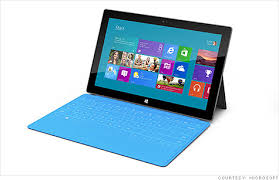

A few days ago, Microsoft unveiled their own computing hardware, namely the Surface tablets. Both tablets are supposed to run Windows 8, will have touchscreen displays and brilliant covers that double as portable, lightweight keyboards. A few days before that, MS had released a 'release preview' of Windows 8 operating system. Two days ago, they unveiled Windows Phone 8, the latest version of their mobile OS.
See the screenshot above. See something similar? Windows 8 and Windows Phone 8 (WP8) share their core components. This is a world first as far as I know. Yes, Android shares its kernel with Linux. But this is entirely different. As you can plainly see, for the first time there is a possibility of having the same user interface and apps on a laptop, a tablet and a phone. I believe we are on the verge of a major revolution in personal computing.
Let's start with Surface. The most popular tablet today is the iPad and I must admit that it might well be the best. It sports a beautiful high-resolution display and Apple's bulletproof app ecosystem. In reality, though, it is just a big iPhone. It does NOT have the power of the desktop as far as productivity is concerned. Similarly, Android tablets also offer numerous options for media consumption, but precious little in the way of creation. We can say that tablets are hampered by their media focus and lack of hardware keyboards, amongst other things, in terms of enabling users to get any actual work done.
Ask yourself: can you create a PowerPoint presentation on a tablet? No. For productivity applications like Office, Photoshop, and other tools, the PC (or Mac) remains the only choice. You cannot write a novel or create your company's budget on a tablet.
The Surface, on the other hand, enables you to do just that while retaining the attractive media capabilities of a tablet, namely portability, long battery life and touchscreen interface. I see that as a foolproof formula.
Today's phones, while extremely capable, again would not allow you to be productive due to size limitations. Phones are not supposed to be productivity tools; rather, they are appropriate for media consumption, web browsing and social media. Which means that right now, there isn't much use for a tablet.
That brings to the conclusion that a perfect all-in-one device would be something that fits in your pocket, yet grows its screen to 10 inches and sprouts a keyboard should you need to do any actual work. Microsoft's recent announcements are the closest to that scenario.
Take Windows 8. Its user interface has been thoroughly revamped so that it resembles that of WP8 and is optimized for touchscreens. Yet, it has a full-fledged OS underneath with technologies like DirectX and other APIs that enable developers to utilize the hardware fully. More importantly, those same technologies will be shared by Windows Phone 8 because the kernels of the desktop and mobile OS are now shared. Unlike Android and iOS, that might bring desktop-like power to mobile applications.
To put it simply, this is the answer to the riddle that why a smartphone today does not perform as well as a desktop despite having desktop-like specs such as quad-core processors, dedicated graphics, HD screens and 1 GB of RAM. Mobile OS's today lack the necessary bandwidth to be able to utilize the hardware to its full capacity, and it is understandable due to battery time considerations.
So in near future I imagine this scenario: I am working on a Microsoft Office document on my laptop. I push that document to my Surface tablet through either a networking connection or a cloud based storage service. I continue to work on Surface and then push it to my WP8-powered phone. Since all three devices have the same version of MS Office, the document opens perfectly. I can take the phone to others and show around the document, make some necessary changes. And those changes are instantly reflected in the document on the other two devices.
I think MS are on the brink of something revolutionary here; they just have to get it right. There are plenty of ways where they can mess up. I am also concerned that MS are on a winning streak of late - XBox360, Office 2010, Windows 7 - and there's always a chance of things messing up!
I beg to differ.
For one thing, Windows remains a towering achievement. It is easy for Apple to create extremely elegant interfaces because they control all the hardware aspects of their products. On the other hand, whenever Microsoft presses a DVD with Windows on it, it has no idea on which device it is going to land. They don't know what processor will it run on, which motherboard, chipset, sound card, video card, RAM, montior, or hard disk it will have to work with. Yet it works. Have you ever installed Windows on a machine and seen it not work?
So, Windows works on 90% of personal computers in the world. It runs any software as long as it is designed for Windows. If you start to count the sheer number of manufacturers involved in your PC or laptop, you will come up short no matter what. There's the brand (such as HP, Dell or Acer), then there is the display, memory, processor, motherboard, chipset, sound card, modem, LAN card, speakers, USB ports, power ports, display connection, bluetooth radio, memory, optical drive....chances are, a different company is responsible for EACH of these components. On the software side, there's your OS, your office suite, your drivers for all the abovementioned components, and anything that you might care to install. Again, they might be coming from dozens of different companies. Yet it all works.
Windows and Office alone make MS the most important company in computing today.
A few days ago, Microsoft unveiled their own computing hardware, namely the Surface tablets. Both tablets are supposed to run Windows 8, will have touchscreen displays and brilliant covers that double as portable, lightweight keyboards. A few days before that, MS had released a 'release preview' of Windows 8 operating system. Two days ago, they unveiled Windows Phone 8, the latest version of their mobile OS.
See the screenshot above. See something similar? Windows 8 and Windows Phone 8 (WP8) share their core components. This is a world first as far as I know. Yes, Android shares its kernel with Linux. But this is entirely different. As you can plainly see, for the first time there is a possibility of having the same user interface and apps on a laptop, a tablet and a phone. I believe we are on the verge of a major revolution in personal computing.
Let's start with Surface. The most popular tablet today is the iPad and I must admit that it might well be the best. It sports a beautiful high-resolution display and Apple's bulletproof app ecosystem. In reality, though, it is just a big iPhone. It does NOT have the power of the desktop as far as productivity is concerned. Similarly, Android tablets also offer numerous options for media consumption, but precious little in the way of creation. We can say that tablets are hampered by their media focus and lack of hardware keyboards, amongst other things, in terms of enabling users to get any actual work done.
Ask yourself: can you create a PowerPoint presentation on a tablet? No. For productivity applications like Office, Photoshop, and other tools, the PC (or Mac) remains the only choice. You cannot write a novel or create your company's budget on a tablet.
The Surface, on the other hand, enables you to do just that while retaining the attractive media capabilities of a tablet, namely portability, long battery life and touchscreen interface. I see that as a foolproof formula.
Today's phones, while extremely capable, again would not allow you to be productive due to size limitations. Phones are not supposed to be productivity tools; rather, they are appropriate for media consumption, web browsing and social media. Which means that right now, there isn't much use for a tablet.
That brings to the conclusion that a perfect all-in-one device would be something that fits in your pocket, yet grows its screen to 10 inches and sprouts a keyboard should you need to do any actual work. Microsoft's recent announcements are the closest to that scenario.
Take Windows 8. Its user interface has been thoroughly revamped so that it resembles that of WP8 and is optimized for touchscreens. Yet, it has a full-fledged OS underneath with technologies like DirectX and other APIs that enable developers to utilize the hardware fully. More importantly, those same technologies will be shared by Windows Phone 8 because the kernels of the desktop and mobile OS are now shared. Unlike Android and iOS, that might bring desktop-like power to mobile applications.
To put it simply, this is the answer to the riddle that why a smartphone today does not perform as well as a desktop despite having desktop-like specs such as quad-core processors, dedicated graphics, HD screens and 1 GB of RAM. Mobile OS's today lack the necessary bandwidth to be able to utilize the hardware to its full capacity, and it is understandable due to battery time considerations.
So in near future I imagine this scenario: I am working on a Microsoft Office document on my laptop. I push that document to my Surface tablet through either a networking connection or a cloud based storage service. I continue to work on Surface and then push it to my WP8-powered phone. Since all three devices have the same version of MS Office, the document opens perfectly. I can take the phone to others and show around the document, make some necessary changes. And those changes are instantly reflected in the document on the other two devices.
I think MS are on the brink of something revolutionary here; they just have to get it right. There are plenty of ways where they can mess up. I am also concerned that MS are on a winning streak of late - XBox360, Office 2010, Windows 7 - and there's always a chance of things messing up!
Wednesday, June 20, 2012
Samsung Galaxy S3: Review
Hello all. For those of you wondering when, if ever, will I pay some mind to the hottest smartphone on the planet (for aggrieved iPhone fans: I said 'smartphone', not 'gadget' or 'toy', so we're all good!), the moment is finally here. I got to spend a few hours with the phone and here are my initial impressions.
LOOKS
Decidedly ordinary. It seems Samsung started on a design then forgot about halfway through. The result is a phone that is shaped like most Toyotas: not horrid but nothing to remember aesthetically. The corners are round, the hardware buttons on the face are ugly. The looks are not helped by the fact that the Galaxy Nexus had broadly the same design, but looks infinitely more classy by comparison thanks to its tasteful dark gray finish and the curved screen.
Looking at the S3, I realized how well designed Galaxy S2 is. Yes, some people thought it infringed on iPhone's design, but as it is it was a good design with distinctive corners. S3 is somehow not that pleasing.
That said, I must mention one thing: in real life the phone is MUCH better looking than the pictures would lead you to believe. Also, this isn't a beauty contest GS3's looks are likely to improve with prolonged usage.
HARDWARE
As you all know the GS3 sports a quad-core Exynos processor by Samsung, an 8 MP camera module, 1 GB RAM, 16 GB internal memory and a 4.8 inch HD screen with SuperAMOLED technology. It is a testament to the advanced specifications being sported by Android phones that I feel the need to discuss only the screen as other components' impact is reflected more accurately in the software.
In 2010 and 2011, Samsung was the king of the display pile. Super AMOLED technology, powering both Galaxy S and S II, ruled the roost in terms of contrast and colour. However, in 2012 that is no longer a given. HTC One X sports an IPS LCD display that is much sharper than that of S3 thanks to its avoidance of the pentile matrix. Pentile vs RGB is a raging debate among display enthusiasts these days. That's right: 'display enthusiasts' - and you thought lessapple was geeky! I will leave that overly complex discussion to your Google skills and come back on topic. One X's display beats that of Galaxy S3 in terms of colours and text sharpness. S3's saving graces are its gorgeous black and contrast ratio. The display is essentially the same as those of Galaxy Nexus and Note.
In real life, of course, the display works exceptionally well. The resolution helps the text sharpness and the colors are bright and rich.
I won't dwell too much on the multimedia features, seeing as they have been uniformly excellent on all Samsung flagship devices since two years. The camera, camcorder, video player, speakers, all work perfectly with added speed thanks to the processing powerhouse underneath.
SOFTWARE
First, let's get the positives out of the way.
1) The icons on the TouchWiz launcer have a soft shadow effect beneath them that makes everything look serene and beautiful - in fact at par with iPhone icons.
2) Samsung have FINALLY given the users an option to arrange icons in the application drawer alphabetically. You know, the method which is most logical and convenient. It took them two years but they finally did it!
Now, let's come to what I really think of the software. In recent times, the Internet has made a noun of a well known verb signifying a lack of desired results, and somehow it says what I feel about TouchWiz (TW) skin on S3 with eerie accuracy.
EPIC FAIL!
Why, you ask? Oh, where do I even begin.
First of all, the desktop sticks to a 4x4 grid. That means 16 slots for you to fill with icons or widgets. Same as 2011. Same as 2010. Same as f***ing 2009. Interestingly, compared to 2010's Galaxy S, the S3's screen has 44% more space and - get this - a freaking 3 TIMES more pixels. So what do Samsung do with all this additional space? Take a look. Galaxy S3 on left, Galaxy S on right.

It looks like last two years did not happen! Oh yes, there's progress. Icons look nicer on S3, though as you can see, they are the SAME mostly. The home screen indicator dot row has been shifted to bottom instead of top. Wow.
To put this in context. Galaxy S launched with Android 2.3. Galaxy S3 has Android 4.0. Google launched Android 4.0 through Samsung's own excellent Galaxy Nexus, approximately seven months ago. That means Samsung had the source code for the OS since months. What did they do? This:
Can you tell these are from different phones? Left one is from Galaxy S2, while right one is from S3! Samsung have made no significant changes to their core apps (contacts, messaging, dialer) and the biggest fallout of this laziness is that some vital functionality present in pure Android 4.0 is missing in Galaxy S3. Of course in some cases the situation is reversed too. But...just LOOK at those screens. Is a little progress too much to ask?
There has also been zero progress in one other area: the buttons below the screen. These are the SAME home, menu and back buttons that were there two years ago. Interestingly, Google has virtually FORBIDDEN the manufacturers to place menu buttons on their phones since Android 4.0 is designed to have a virtual menu key. Thanks to Samsung's insistence on sticking to the old ways, that functionality is disabled. This is the same company that made the Galaxy Nexus with the glorious software navigation bar, having no buttons on its face. Six months later, we are back to a 3 year old design. Progress!
Galaxy Nexus on left, S3 on right. Which looks better? I know.
Rest is business as usual. Whatever improvements are there, those are provided by Google themselves. Gmail, YouTube, browser, Gallery, Music - all are elegant and work flawlessly. Frankly, I lost interest in whatever Samsung had to offer within 5 minutes. Having tried the elegant, understated, professional and futuristic vanilla Android 4.0 on my Note and Nexus before it, TW seemed like a step back to the 1950s, sort of like using Windows XP after Windows 7. I think Samsung's dogged adherence to its tried and true interfaces represents a gross under-estimation of its customers' intelligence. That is also evident in the features Samsung touts about: the 'nature' user interface (some wallpapers and watery sounds), S Voice (Apple Siri wannabe), some useless motion based features that no one will use after the first time.
Make no mistake: TouchWiz is good enough for Galaxy users; it just sucks when seen in a grand scheme of things. I, for one, think that had Samsung stuck to a closer visual representation of Android 4.0, they had an even better chance of going after iPhone 5 in his home territory: elegant user interface. As things stand, it is a sad mishmash of various influences that ultimately add no value to the pure Android experience.
Please bear one thing in mind, though. The phone is the fastest one I have ever used. All my aesthetic misgivings, however well founded, ultimately can't take away from the sheer horsepower of the device and how Samsung have optimised their software to take full advantage of it. There, too, I won't be giving them 100 marks. Sometimes the contacts and messaging apps take a few seconds to open. Same as 2011. Same as 2007. You know the drill. That is the actual reason I came down so hard over TW earlier in my review. There is no forgiving even a little bit sloppiness for a flagship device in 2012.
There are some other gripes. The phone has the UGLIEST in-call screen I have EVER had the misfortune of laying my eyes upon. You know what's missing from TW? REFINEMENT. You do expect some refinement in a product costing 62k. Apple does refinement extremely well. So does HTC. So does Google since last year or so. What's stopping Samsung.
Here is another, far more in-depth look at the S3 user interface. The guy nails it.
http://www.androidpolice.com/2012/06/19/samsung-galaxy-s-iii-review-not-revolutionary-but-another-solid-step-forward-for-android/
CONCLUSION
Thanks to the pathetic choices on the software front, I have a hard time recommending S3 wholeheartedly. Yes, this is the first Samsung flagship that has launched in Pakistan along with rest of the world, at a very reasonable price and with full warranty. As such, the package cannot fail.
But, sadly, I have seen much, much better software. Vanilla Android 4.0 puts everybody in a bad light. HTC's One X sports a better display and its Sense 4.0 is at least substantially progressed over previous versions.
So while the hardware, camera and processing power alone justify the asking price of S3, it is no longer a one-horse race and the biggest competition, I believe, is its elder sibling, Galaxy Nexus. I know that's not an opinion you will find on most tech sites, but that's what I am here for.
Last word: THINK before you buy.
Subscribe to:
Posts (Atom)